
Building RigSight
Rebuilding RigSight's widgets as boxes of tiles
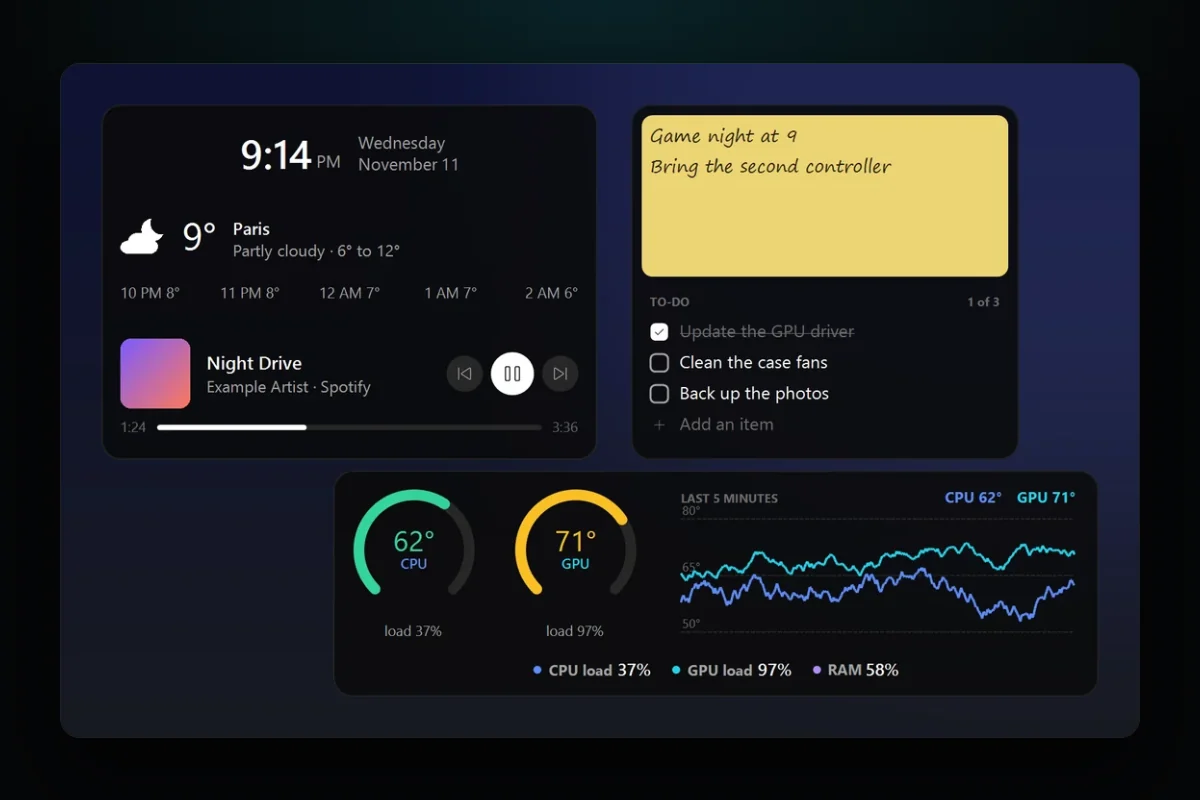
RigSight 1.9.0 turned every widget into a box you fill with tiles, your readings next to a clock, notes, a to-do list or the weather. Getting there meant centring clocks by their ink and making a picture on the desktop take clicks and typing.
The short version
In 1.9.0 a widget became a box you fill with any number of tiles, readings next to a clock, notes or the weather. Clocks had to be centred by their ink, and two bugs showed up on my own desktop first.
Until 1.9.0, a RigSight widget was one layout with a handful of readings in it. You picked a line of readings, a grid of them, a few rings or a graph, and each widget did that one thing.
On 9 November I started rebuilding them. I wanted widgets good enough to use instead of Windows' own, and I wanted you to decide what goes in one and how it looks. The main rule was no limits. If someone wants an odd widget that doesn't even fit on their screen, that's their call.
Desktop widgets as boxes of tiles
So a widget became a box you fill with tiles. The box is a grid of small cells, 40 by 32 pixels at size M, and a tile covers as many cells as you give it. There are 16 kinds of tile. Six are about your PC. One shows any reading as a number, a ring or a graph, and the others show a line of readings, a temperature graph, FPS, your day so far and the app you're using. The other ten are everyday things. There's a clock, the date, a calendar, notes, a to-do list, a timer, what's playing, the weather, shortcuts and photos.
A widget can hold as many tiles as you like and be any size. Tiles never overlap. Drop one on another and the other moves out of the way, and RigSight never rearranges them by itself. If a widget gets wider than your main screen, the editor tells you and lets you carry on. The editor is a whole page now, with the widget shown as it will look and ready sizes for each tile.
Where widgets sit changed too. Until 1.9.0 they stayed on top of your windows. Now every widget sits on the desktop, under your windows, and a shortcut you set brings them all in front.
Clocks that only looked centred
In my mock-up of the new widgets, none of the clocks looked centred in their tiles. So I took pictures of each one and measured the gap between the drawn digits and each edge of the tile. A 1 pixel border, counted inside the box, pushed everything a pixel up and to the left. The clocks made only of text sat 2 pixels low, and the flip clock's digits sat 1.5 pixels low. After the fixes, every clock in the mock-up measured within 1 pixel.
A line of text keeps room above and below its letters, so the middle of the line isn't the middle of the digits. In the app, RigSight centres a clock by its ink, the pixels it draws. It draws the text once on its own, finds where those pixels start and stop, and moves the whole clock until that box sits in the middle of the tile. A test draws every clock style and the date, finds the ink on the picture, and fails if the gap on one side is more than 1 pixel bigger than on the other, or 2 pixels at 150% scale.
Clicks and typing on a picture
The RigSight window you open doesn't draw the widgets. The recorder does, the part of RigSight that runs all day. Each widget is a picture in a see-through window, and that window never takes focus, so the app you're typing in keeps the keyboard.
That was fine while widgets only showed readings. The new tiles need clicks and typing, and a picture has no buttons in it. So each time the recorder draws a widget, it also notes where it drew each thing you can click, like a to-do's box or a timer's Start. A click on one of those places does that thing. A press anywhere else still drags the widget.
Typing was harder, because a window that never takes focus can't be typed into. My first try showed a real text box over the note when you clicked it. It didn't look like the widget, and a new to-do item went behind it. Now a click on a note or a to-do list opens a window you can't see, holding a text box that takes the keys. The widget draws what you type itself, in its own font and colours, with its own caret. Nothing takes the keyboard until you click, and Esc or a click anywhere else gives it back.
The one tile that goes online
Every other tile works without the internet. Weather can't, so it's the only tile that goes online. The forecast comes from MET Norway, the Norwegian Meteorological Institute. RigSight sends only the place's position, rounded to about a kilometre, and asks for a place's forecast at most every half hour. When you look a place up in the editor, the name you typed goes to OpenStreetMap's Nominatim to find it. The tile's settings credit both, and the privacy page says what each one sees. Remove the tile or turn its widget off, and RigSight stops asking.
Two bugs on my own desktop
The first was a widget that kept going back. Drag it on the desktop, change something in the editor, and it jumped back to where it had been. Drag it on the Widgets page's map of your screens, and the widget on the desktop didn't move at all. The editor saved its whole copy of the widget at every change, including where it sat when you opened it. I fixed that first, but the map still did nothing.
So I followed one move the whole way, from the map to the widget's window on the desktop. The recorder moves that window when you drag a widget on the desktop, so it keeps its own record of where each widget sits. When the app sent its settings over, the recorder kept its own spot for every widget and threw the map's move away. Now the app sends the recorder a move of its own, and the recorder moves the window. I checked it on a running copy, and a test now drags a widget on the map and checks that the move reaches the recorder.
The second was worse. On the morning of the release, with a test build on my own PC, all 13 of my widgets disappeared at once. The recorder's log showed the app removing them, and the Remove button explained why.
Before the fix
After a Remove, the page picked the next widget, with its own Remove button right under the pointer. A double click, or one more click to be sure, took that widget too.
In 1.9.0
The page picks nothing after a Remove. It says which widget went, with Undo where Remove was, for a few seconds.
The editor's Remove has the same Undo now. A test presses Remove six times in a row and checks that only one widget goes.
After those two, I went through all of it again in five parts before the release, one each for the settings, the windows on the desktop, the drawing, the Widgets page and editor, and privacy and security. About fifty smaller fixes came out of it. One was a Photos tile set to a folder on another PC that couldn't be reached. It froze the widgets for about 21 seconds every minute, because Windows waits that long before saying the folder isn't there. RigSight reads a folder like that in the background now, and the widgets keep drawing.