
PC problems · Temperatures
Why GPU hotspot temperature runs high, and when the gap is bad
Why the GPU hotspot temperature always reads higher than the GPU, what gap is normal, when 100°C is a problem, and how RigSight watches the gap for you over weeks of play.
The short answer
The GPU hotspot temperature is the hottest of many sensors on the graphics chip, so it always reads above the main GPU temp. As a rule of thumb, a gap of about 10 to 20°C under load is common. AMD says up to 110°C on Radeon cards is within spec. A gap past about 30°C often points to paste or cooler contact.
Your monitoring app shows two GPU temperatures. One says 72°C and the other, labelled hot spot, says 94°C. The GPU hotspot temperature always reads higher, and that's by design. What tells you whether something is wrong is how far apart the two are, and whether that gap has grown. A gap that grows does it slowly, over weeks, which is exactly what nobody notices by glancing at a number.
How RigSight spots a bad hotspot gap
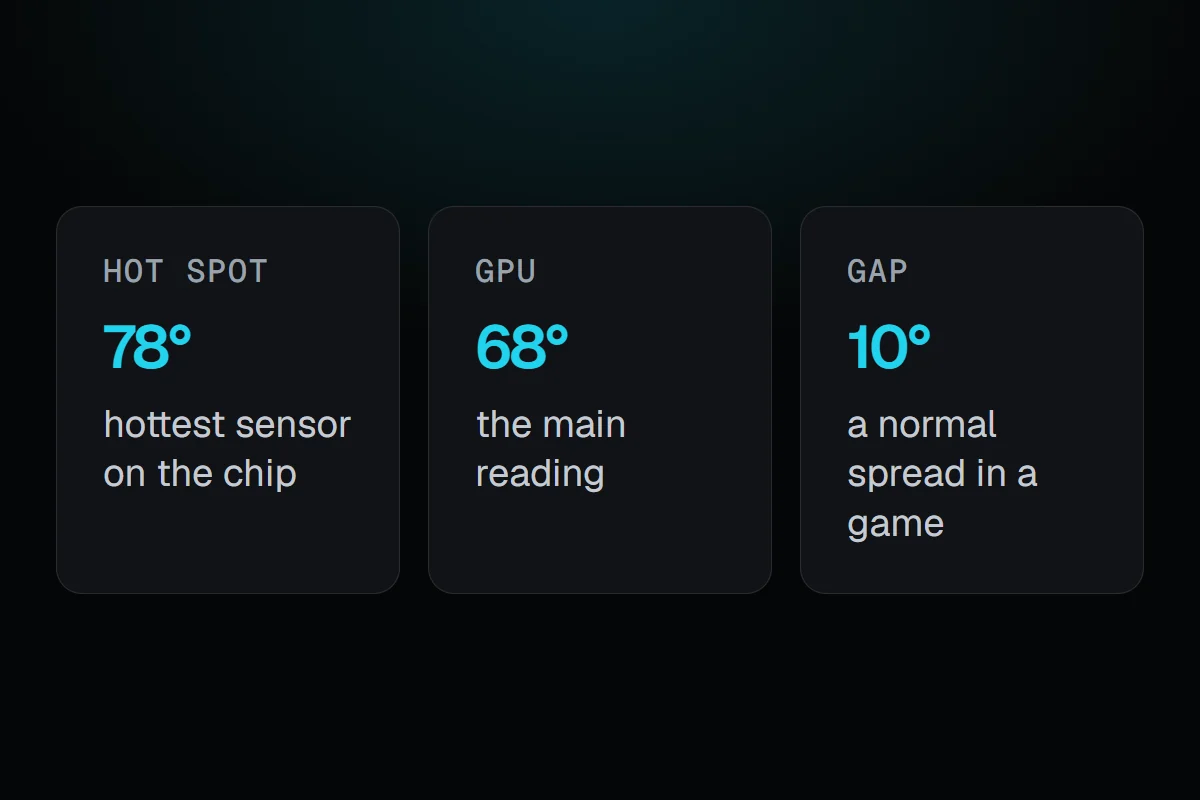
Here is what it looks like on the demo PC in RigSight's own pictures, an RTX 3080 Ti. The GPU reads 68° and its hot spot 78°, a 10° gap, which is healthy. RigSight keeps that gap as history, so a gap that creeps up shows in the history.
RigSight is a free, open-source PC monitor for Windows that records your temperatures all day and keeps them as history. When your card reports a hotspot, the GPU card on the Temperatures page shows it as its own tile, next to the memory junction, with today's lowest and highest under it. The history graph draws GPU hot spot as a line beside the main GPU line, so you can see the gap across a whole evening of play.
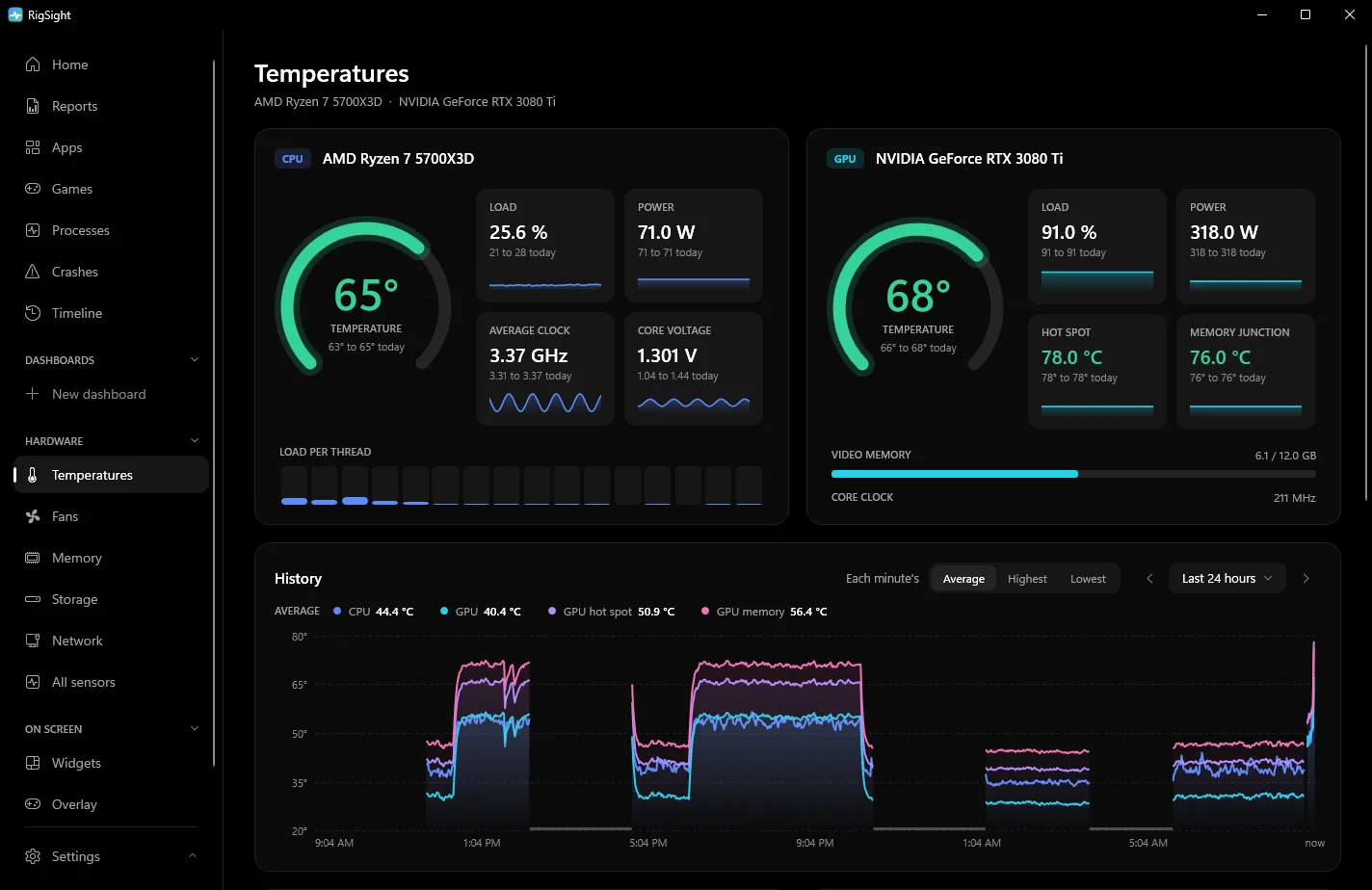
RigSight also watches the gap for you. When the hotspot runs 30° or more above the core over 20 minutes or more of steady heavy load, Reports says so and adds that the thermal paste or cooler contact may have worn. Reports' Peaks list includes the day's highest GPU hot spot reading and the app that was running.
For a warning while you play, Settings has Notifications > Temperature alerts with a GPU hot spot limit. It starts at 100° and can be set from 70 to 110°, so a Radeon owner can set it just under AMD's 110°C.
Why the GPU hotspot runs hotter
A modern graphics chip has many temperature sensors spread across it. AMD explained this in 2019 for its RX 5700 cards. An array of sensors is spread across the chip, and the highest reading from any of them is the hotspot, which AMD also calls the junction temperature.
The ordinary GPU temperature is a single, general reading for the chip. On AMD cards some apps call it the edge temperature. Some parts of the chip always work harder than others, so one spot is always warmer than the general reading. That warmest spot is the hotspot.
GPU hotspot temperature vs GPU temp, and the normal gap
Under load, the hotspot usually runs about 10 to 20°C above the GPU temperature. Some high-power cards sit a little past that and are still fine. This range is a rule of thumb from people who build and repair PCs. Neither NVIDIA nor AMD publishes an official figure for the gap.
- A gap of 10 to 20°C under load is common.
- A gap of 20 to 25°C can be normal on big, power-hungry cards.
- A gap past about 30°C often means the cooler isn't pressing evenly on the chip, or the thermal paste has dried out or spread unevenly.
Two things make the gap meaningful. Compare at steady load, a few minutes into a game, because at idle both readings are low and close. And compare like for like, with the same game on the same card, before and after. A gap that was 15°C a year ago and is 30°C now tells you far more than one reading against a forum post.
What the makers say about a GPU hotspot temperature of 100°C, 105°C or 110°C
AMD has been clear about its own cards. In 2019 it said a junction temperature of up to 110°C during typical gaming on the RX 5700 series was "expected and within spec". AMD said the card keeps raising its clocks until any one sensor reaches 110°C.
The RX 7900 XTX shows why the gap matters. After it launched, some owners of AMD's own reference cards saw the hotspot reach 110°C while the main temperature stayed much lower, and the cards slowed down. At the start of 2023 AMD said the problem was related to the thermal solution on a limited number of its reference cards, and asked affected owners to contact AMD Support. A hotspot at its limit with a normal main reading was the sign.
NVIDIA publishes one figure per card, the "Maximum GPU Temperature", for example 90°C for the RTX 4070 family. It doesn't publish a separate hotspot limit. On a GeForce card, a hotspot of 100°C with the main reading in the high 80s is a normal spread on a hot card. A hotspot past 100°C with the main reading in the 60s or 70s is a big gap and worth looking into. Tom's Hardware reported an RTX 5070 Ti throttling with its hotspot at 107°C, which a repair technician traced to badly applied thermal paste.
Why your card might not show a hotspot
Not every card reports one, and not every app reads it. When the RTX 50 series launched in early 2025, NVIDIA stopped giving the hotspot reading to common monitoring tools, so apps such as HWiNFO and GPU-Z showed only the main temperature. The sensor was still on the chip. In 2026 HWMonitor, HWiNFO and GPU-Z 2.71.0 started to read the RTX 50 hotspot again, so update your app if it shows none. Older GeForce cards like the RTX 30 and 40 series show it, and AMD lists the hotspot for the Radeon VII, the RX 5000 series and newer.
How to check your GPU hotspot temperature
Task Manager shows only the main GPU temperature, so you need a sensor app.
- In GPU-Z, open the Sensors tab and look for Hot Spot.
- In HWiNFO, start it in Sensors-only mode and find GPU Hot Spot Temperature under your GPU.
- In MSI Afterburner, open Settings > Monitoring and see whether a hotspot entry is in the list for your card. On some cards it has a plain name such as GPU temperature 2. If there's no second GPU temperature, your card or version doesn't report it there, and HWiNFO or GPU-Z is the better choice.
Play for 10 minutes or so, then note both readings at the same moment. That pair is your gap.
What to do if the gap is too big
- Clean the card first. Dust in the cooler raises both readings, and a clean cooler gives you a fair baseline.
- Check the warranty before you open anything. If the card is still covered and the gap is past 30°C on a fairly new card, contact the card maker. Taking the cooler off can void the warranty on some brands.
- If the card is out of warranty and you're comfortable doing it, new thermal paste and, where the card has them, new thermal pads usually bring a large gap back down. Tighten the cooler screws evenly, a little at a time in a cross pattern.
- After any change, play the same game for the same time and compare the gap with what you saw before.
If only the main GPU temperature is high and the gap is normal, the chip and cooler are in good contact, and the heat is a matter of airflow, dust or settings. Normal GPU temperature while gaming covers that side, and PC overheating while gaming has the full list of fixes.
Next, write down your gap after 10 minutes in your usual game. If it's under 20°C, leave it alone. If it's past 30°C, clean the card, check the warranty and plan the repaste or the return.
Questions people ask
What is the difference between GPU hotspot temperature and GPU temp?
The GPU temp is one general reading for the chip. The hotspot is the highest reading from a whole grid of sensors across the chip, so it's always the warmer of the two. What matters most is the gap between them, not the hotspot on its own.
Is a GPU hotspot temperature of 100°C bad?
On an AMD Radeon card, 100°C is below the 110°C AMD calls within spec. On any card, look at the gap. A hotspot of 100°C with the GPU temp at 85°C is a normal spread, while 100°C with the GPU temp at 65°C points to poor contact between the cooler and the chip.
Is 85 degrees hot for a GPU hotspot?
No. A hotspot of 85°C is an ordinary reading in a demanding game. It usually means the main GPU temperature is somewhere in the 60s or low 70s.
What is a normal GPU hotspot temperature range?
In games, hotspots in the 80s and 90s °C are common, and Radeon cards can go higher while staying within AMD's spec. The gap to the main GPU temperature tells you more. As a rule of thumb from builders, not a maker's spec, about 10 to 20°C is common, and past about 30°C deserves a closer look.
Why can't I see the hotspot on my RTX 50 series card?
When the RTX 50 series launched in early 2025, NVIDIA stopped handing the hotspot reading to common monitoring tools, so most apps showed only the main GPU temperature. In 2026 HWMonitor, HWiNFO and GPU-Z 2.71.0 added it back. If your app shows no hotspot, update it.