
PC problems · FPS and games
Normal GPU usage while gaming, and why 99% is a good sign
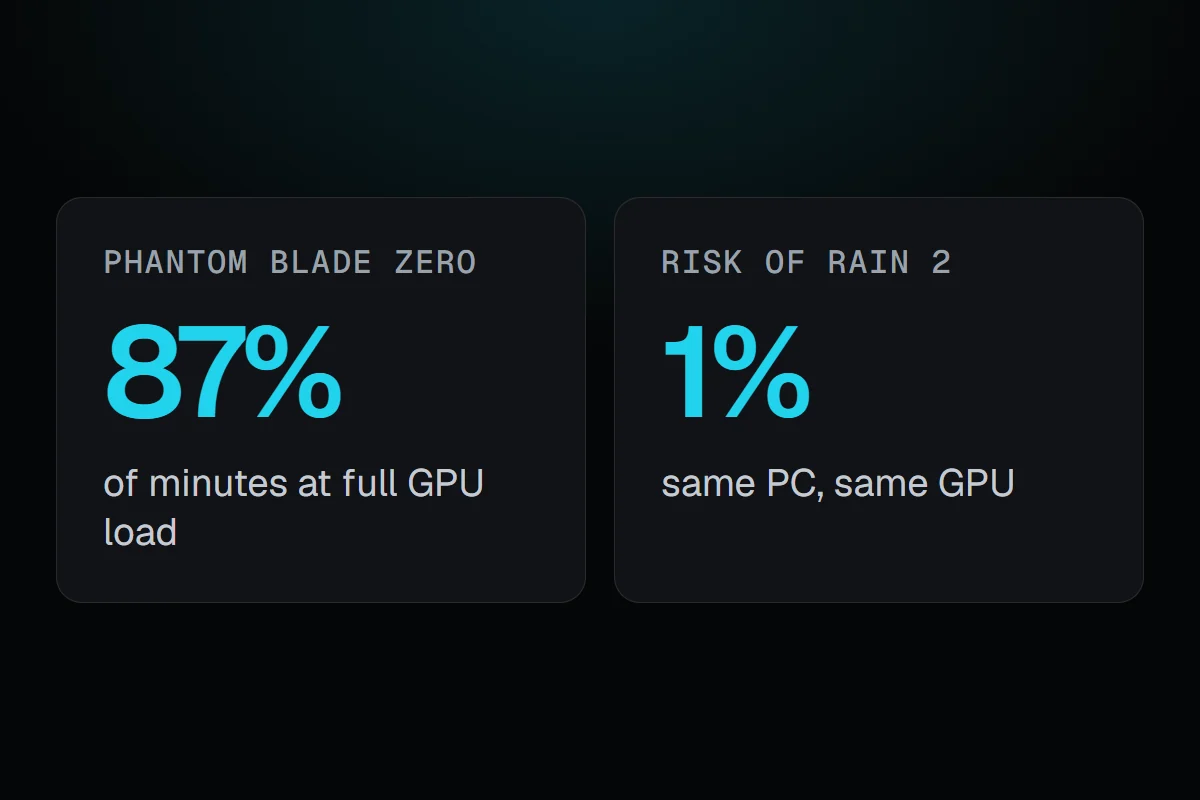
On my PC, Phantom Blade Zero kept the GPU 95% busy or more 87% of the time, and Risk of Rain 2 only 1% of the time. What normal GPU usage while gaming looks like, why near 100% is fine, and what low usage tells you.
The short answer
Normal GPU usage while gaming is 95 to 99% in a demanding game with no frame cap. That's the GPU doing all it can, and it's safe. Much lower usage isn't a fault either. It means something else sets the pace, a frame limit or V-Sync, the CPU, or a light game. It only matters when the frame rate is lower than you want.
Two of my games show how wide normal GPU usage while gaming can be. In Phantom Blade Zero, my RTX 3080 Ti was at full load, 95% busy or more, in 87% of the minutes I played, at about 68 FPS. In Risk of Rain 2 on the same PC, it was at full load in 1% of the minutes and averaged 55% busy, at about 151 FPS. Neither one is a problem. They just tell you different things about what holds the frame rate back.
How RigSight caught it
RigSight records the GPU's usage every minute, next to the frame rate from RivaTuner and the game in front. On the Games page, each game's Can it run better? card turns that into one line. When the GPU was at full load most of the time, it says so and that lower settings would give more frames. When it was at full load only some of the time, it says the GPU is the limit in busy scenes. When it rarely or never was, it says something else sets the pace, most likely the CPU.
If the game holds a flat frame rate, the card names what holds it there, the game's own frame limit or V-Sync, from the game's saved settings when RigSight can read them. You can also put GPU usage in the overlay, the taskbar or a widget to watch it live. RigSight is free and open source.
Normal GPU usage while gaming
Here is what each of my games did, all on one RTX 3080 Ti with a Ryzen 7 5700X3D.
- Crimson Desert averaged 97% GPU usage, at full load 89% of the time.
- Phantom Blade Zero averaged 95%, at full load 87% of the time.
- REMATCH averaged 87%, at full load 24% of the time.
- Dota 2 averaged 64%, at full load 1% of the time.
- Risk of Rain 2 averaged 55%, at full load 1% of the time.
- Slay the Spire 2 averaged 41% and never reached full load, at almost 400 FPS.
The heavy, good-looking games kept the GPU near 100%. The lighter ones ran at high frame rates with the GPU half busy. Both are normal.
Is 100% GPU usage normal while gaming?
Yes, and in a demanding game it's what you want. A GPU at 95 to 99% is drawing frames as fast as it can, so nothing else is holding it back. It's built to run like that for hours. Watch the temperature, not the usage. Normal GPU temperature while gaming has the limits.
Two cases where near 100% is worth a look.
- High usage on the desktop or in a light game with a low frame rate. Check Task Manager's Processes tab sorted by GPU for something else using it, like a browser with video or a background app.
- A game in a menu running at hundreds of FPS. Some games don't cap their menus, which keeps the GPU busy and hot for nothing. A frame limit fixes it.
Why GPU usage is lower in some games
- A frame limit or V-Sync. The GPU finishes each frame early and waits, so usage drops while the frame rate stays flat.
- The CPU. If the processor can't prepare frames fast enough, the GPU waits for it. Games with many units or players lean on the CPU, and total CPU usage can look low while one or two cores are full.
- A light game. A card made for heavy games has room to spare in a small one.
Low usage only matters when the frame rate is lower than you want. Then GPU not at 100% usage but low FPS walks through finding what the GPU waits for.
How to check GPU usage while gaming
- Press Ctrl + Shift + Esc to open Task Manager, open Performance and click your GPU. The graph marked 3D is what games use.
- For the game itself, the Processes tab has a GPU column you can sort by.
- To see it while you play, use an overlay that shows GPU usage, like Xbox Game Bar's Performance widget, the NVIDIA app or RivaTuner. How to show FPS on PC covers each.
Your next step is to check GPU usage and the frame rate together in your heaviest game. Near 100% means the GPU is the limit, so lower settings or upscaling give more frames. Well below that, with a frame rate you're unhappy with, means look at the CPU or a frame cap next.
Questions people ask
Is 100% GPU usage normal while gaming?
Yes. In a demanding game with no frame limit, the GPU should be close to 100% busy, because it draws frames as fast as it can. Usage shown as 97 to 99% is the same thing. It's safe as long as the temperature stays within the card's limits.
Is 99% GPU usage bad?
No. It means the GPU is what limits your frame rate, which is how a gaming PC is meant to run. To get more frames, lower the graphics settings or use upscaling like DLSS or FSR.
What is normal GPU usage while gaming?
There isn't one number. On my PC it ranged from 41% in Slay the Spire 2 to 97% in Crimson Desert. Light games, frame caps and games that lean on the CPU all keep it lower.
Why is my GPU usage low while gaming?
Usually a frame limit or V-Sync is holding the frame rate, the CPU can't prepare frames fast enough, or the game is light. If your frame rate is fine, low usage isn't a problem. If it isn't, see GPU not at 100% usage but low FPS.