
PC problems · FPS and games
VSync caps FPS at 60? Why it happens, and VSync vs an FPS cap
Rocket League sat at 144 FPS on my 144 Hz screen with its GPU 37% busy, because VSync was on. Why VSync caps FPS at 60 or even 30, how it compares with an FPS cap, and the setup to use with G-Sync and FreeSync.
The short answer
VSync holds the frame rate to your monitor's refresh rate, so a 60 Hz screen caps at 60 FPS. If it caps at 60 on a faster screen, Windows or the game is running it at 60 Hz. VSync stops tearing but adds input lag. With G-Sync or FreeSync, cap the frame rate at least 3 FPS below the refresh rate.
When I played Rocket League on 6 November, it sat at 144 FPS for most of an 11-minute match. My RTX 3080 Ti was only 37% busy, so it could have drawn far more frames. It didn't, because Rocket League's settings had VSync on and my screen runs at 144 Hz. That's the whole reason VSync caps FPS at 60 on so many PCs. It holds the frame rate to how often the monitor draws, and most monitors draw 60 times a second.
Test setup
- GPU
- NVIDIA GeForce RTX 3080 Ti, 12 GB
- CPU
- AMD Ryzen 7 5700X3D
- Memory
- 16 GB, 32 GB from 14 November 2026
- Windows
- Windows 11
- Screen
- 2560 x 1440 at 144 Hz
- Recorded
- 18 October to 11 November 2026, frame rates from RivaTuner
- Counted
- Minutes with a game in front and a frame rate
Here is where VSync or a cap leaves you on common screens. The cap for G-Sync and FreeSync comes from Blur Busters' testing, explained further down.
| Screen | VSync caps at | Cap with G-Sync or FreeSync |
|---|---|---|
| 60 Hz | 60 FPS | 57 FPS or lower |
| 120 Hz | 120 FPS | 117 FPS or lower |
| 144 Hz | 144 FPS | 141 FPS or lower |
| 165 Hz | 165 FPS | 162 FPS or lower |
| 240 Hz | 240 FPS | 237 FPS or lower |
Why VSync caps FPS
Your monitor redraws the picture a fixed number of times per second. That number is its refresh rate. The GPU makes frames at its own pace. When a new frame arrives halfway through a redraw, the top of the screen shows one frame and the bottom shows the next. The line between them is screen tearing.
VSync, short for vertical sync, stops this by making the GPU wait until the monitor finishes a redraw before it sends the next frame. The GPU can't send frames faster than the monitor draws them, so the frame rate tops out at the refresh rate. On a 60 Hz screen that is 60 FPS, and on mine it's 144.
VSync caps FPS at 60 on a 144 Hz monitor
If you have a faster monitor and still see a 60 cap, Windows or the game is running the screen at 60 Hz. Check Windows first.
- Open Settings > System > Display.
- Pick your gaming monitor at the top if you have more than one.
- Open Advanced display and set Choose a refresh rate to the highest number.
Then check the game's own display menu for a refresh rate setting. Also check the cable. Older HDMI cables and ports can limit high refresh rates at high resolutions, so DisplayPort is often the safer choice.
Why VSync caps FPS at 30
With classic double-buffered VSync, a frame that misses a redraw has to wait for the next one. If your PC makes 55 frames a second on a 60 Hz screen, many frames miss their slot and wait a full extra redraw. The frame rate drops to 30, half the refresh rate, then climbs back when the scene gets lighter. That jump is what people describe as VSync capping at 30.
To get out of it, lower the settings until the game holds 60, or turn on triple buffering if the game offers it. A G-Sync or FreeSync monitor removes the problem.
Is VSync good for FPS?
VSync never gives you more FPS. It only limits them. What it gives you is a picture without tearing. The cost is input lag, because finished frames wait in line for the screen. In slower games, racing games played with a pad, or anything where tearing bothers you more than a few milliseconds of delay, VSync is a fine choice. In fast competitive shooters, most players turn it off.
VSync vs FPS cap
An FPS cap, also called a frame limiter, tells the game to stop at a number you pick. It doesn't wait for the monitor, so it adds far less lag than VSync. It also doesn't stop tearing on its own. You can set one in several places.
- The game's own Frame rate limit setting. This is usually the best one, since the game paces itself.
- In the NVIDIA Control Panel, use Manage 3D settings > Max Frame Rate. NVIDIA's help page lists a range of 20 to 1000 FPS.
- In AMD Software, use Frame Rate Target Control or Radeon Chill, which can lower the frame rate when little moves on screen.
- RivaTuner Statistics Server's Framerate limit, per game or for all.
A cap costs you frames you might not see and saves power and heat. My own Risk of Rain 2 history shows both sides. From 18 to 27 October it spent about half its minutes at 144 FPS and hardly went above it, averaging 135 FPS with the GPU about half busy, drawing 237 W at 63°C. From 28 October it no longer stopped at 144, and today its settings have no frame limit and VSync off. Over the next 13 hours of play it averaged 183 FPS and 1% lows of 114, with the GPU 64% busy, drawing 264 W at 66°C.
So without the cap I got about 48 more frames a second for about 27 W more and 2 to 3°C more on the GPU. On a 144 Hz screen, frames above 144 only ever reach it in pieces, as tearing. Those extra frames do cut input lag a little, so in a fast shooter they can be worth it. In a game like Risk of Rain 2, a cap near the refresh rate gives almost the same picture for less power.
The G-Sync and FreeSync setup most people want
G-Sync and FreeSync turn the problem around. Instead of the GPU waiting for the monitor, the monitor waits for the GPU and redraws whenever a frame is ready. You get no tearing and little lag, as long as the frame rate stays inside the monitor's variable refresh range.
Blur Busters' G-Sync testing gives the widely used setup.
- Turn on G-Sync in the NVIDIA Control Panel under Set up G-SYNC, or FreeSync in AMD Software and the monitor's own menu.
- Turn VSync on in the driver, Manage 3D settings > Vertical sync for NVIDIA, and off in the game.
- Cap the frame rate at least 3 FPS below the refresh rate, using the table at the top. Blur Busters gives 3 FPS as the minimum, so a little lower is fine too.
The cap keeps you inside the variable refresh range. Without it, the frame rate hits the top of the range and VSync takes over again, with its lag. The driver VSync covers the moments when frame times jump past the limit. AMD notes that Frame Rate Target Control can keep you from going over your FreeSync range in the same way.
A flat line means a cap
If your FPS sits on one number for minutes at a time, the PC isn't struggling. Something is holding it there. These are the usual causes.
- VSync, in the game or forced in the graphics driver.
- A frame limit in the game, the driver or RivaTuner that you forgot about.
- NVIDIA's Background Application Max Frame Rate, which only applies when the game isn't the window in front.
- Radeon Chill, which moves the frame rate between two caps by how much happens on screen.
- A game engine with its own fixed limit, such as 60 or 120.
Not every cap is easy to find. Apex Legends also sat at 144 FPS most of the one session I played on 11 November, yet its saved settings have VSync off, so the cap came from somewhere I haven't tracked down.
The giveaway is GPU usage. A capped game leaves the GPU well under full load, because it finishes each frame early and waits. Rocket League at 37% is a clear case. If the frame rate isn't flat and GPU usage is still low, the CPU is the more likely limit. GPU not at 100% usage but low FPS shows how to tell, and normal GPU usage while gaming has what my other games did.
How RigSight caught it
RigSight records the frame rate from RivaTuner every minute, next to the game in front and the GPU's usage, power and temperature. That's where every number above comes from. Since 1.17.0 it also records the frame rate itself when it has admin rights, so RivaTuner is no longer needed for the history.
On the Games page, a game's Can it run better? card looks for a cap once the game has three plays with frame rates. If at least half its plays sit within 3% of the highest one, it says the game is flat at that frame rate most of the time. It also reads the game's own saved settings, shown under How it's set, so it can say whether the game's frame limit or V-Sync is what sets the pace. When the GPU was at full load less than 30% of the time, it adds that you can raise the settings and keep that frame rate.
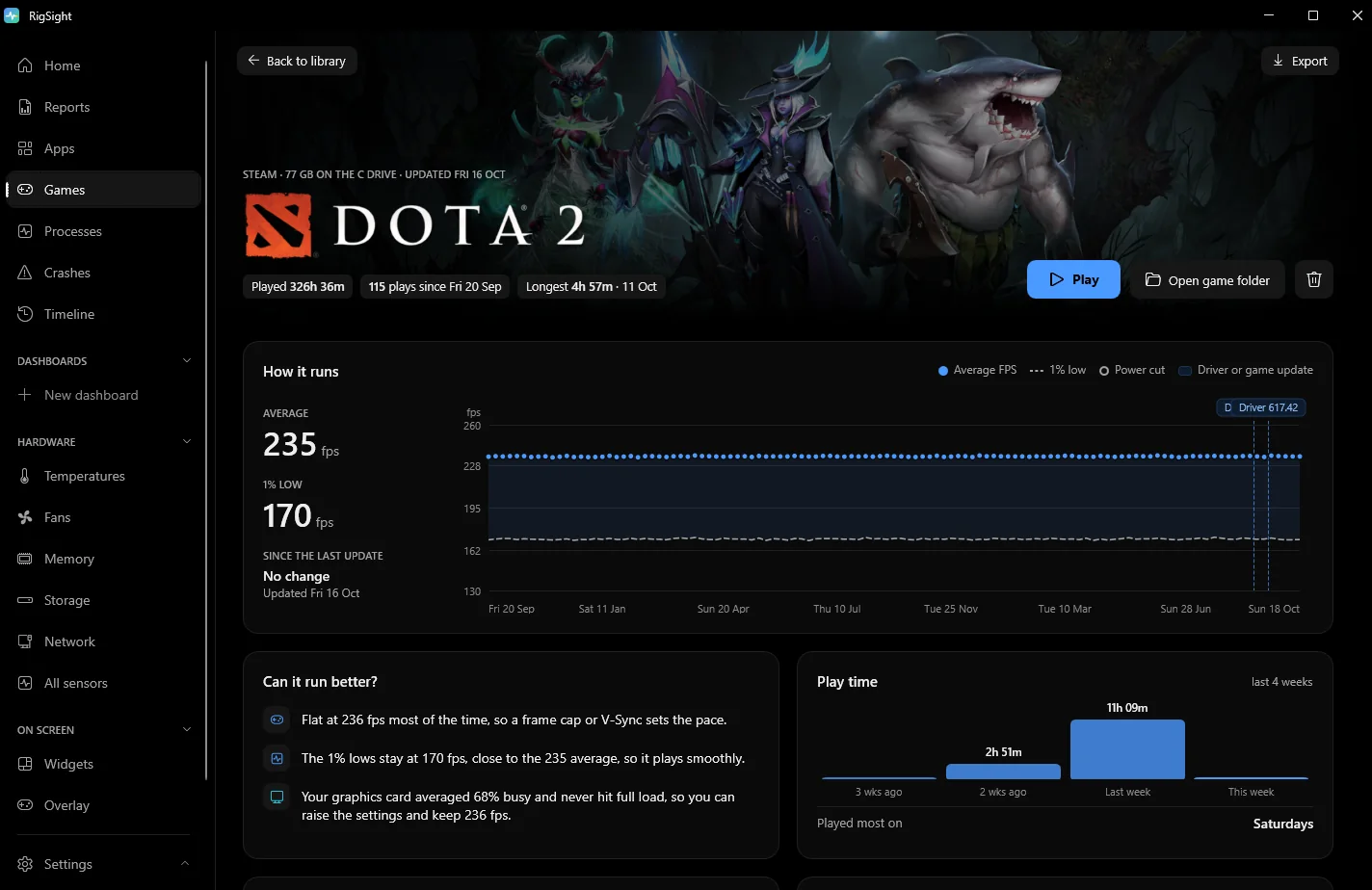
It works the other way too. When a game has no frame limit and V-Sync is off, and it runs at about the screen's refresh rate or faster, the card suggests a limit 3 FPS under the refresh rate in the game's settings, to keep frames even and the GPU cooler. RigSight is free and open source.
Your next step is to look at your FPS counter in your next game. If it sits on one number with the GPU well under full load, find which setting holds it there and decide whether that's the cap you want. If it runs far above your refresh rate, try a cap 3 FPS under it and see whether you can tell the difference.
Sources
- Blur Busters, Gsync101 input lag tests and settings
- Blur Busters, Gsync101 input lag tests and settings
- NVIDIA, Manage 3D Settings (reference)
- AMD, Frtc
- AMD, Radeon software chill
- AMD
- AMD
- Microsoft Support, Change the refresh rate on your monitor in windows
- How RigSight measures, how the numbers from my PC were recorded
Questions people ask
Why does VSync cap FPS at 60?
VSync makes the GPU wait for the monitor to finish drawing before it shows the next frame. A 60 Hz monitor draws 60 times a second, so you get at most 60 FPS. On a 144 Hz monitor it caps at 144, unless Windows or the game runs the screen at 60 Hz.
Why does VSync cap FPS at 30?
With classic double-buffered VSync, a frame that misses one refresh waits for the next one. If your PC can't hold 60 FPS on a 60 Hz screen, the frame rate falls to 30, half the refresh rate. Triple buffering, a G-Sync or FreeSync monitor, or turning VSync off avoids the jump.
Is VSync good for FPS?
No, VSync never raises FPS. It limits FPS to stop screen tearing, and it adds some input lag. It suits slower games where tearing bothers you more than a little delay, and suits fast shooters less.
Which should I use, VSync or an FPS cap?
An FPS cap limits frames without waiting for the screen, so it adds less lag, but it can still tear. VSync removes tearing but adds lag. With a G-Sync or FreeSync monitor, use variable refresh with a cap at least 3 FPS below the refresh rate.